
How To: One PO Per Carton
With scannable carton barcodes
When a delivery arrives with multiple pallets, it’s tempting to upload one large PO that includes everything on the truck. In practice, that approach slows receiving and makes it harder to isolate issues. A single discrepancy can stall the entire receipt, and it becomes difficult to quickly identify which carton is missing, mislabeled, short, or mixed.
Our preferred method is: one PO per carton.
Each master carton is treated as its own PO, with a unique PO number encoded in a barcode on the carton label. When our team scans the barcode on the Receiving page in ShipHero, the correct PO instantly pops up. This speeds up receiving dramatically and makes discrepancies much easier to find and resolve.
Why “One PO per carton” benefits you (the brand)
Faster receiving = faster inventory available to sell
Receivers don’t have to scroll, search, or work through a massive PO.
Each carton is processed independently, so progress is continuous.
Issues are isolated instead of blocking the whole delivery
If one carton is short/missing/mislabeled, only that carton’s PO is impacted.
We can quickly communicate: “Carton PO 12362 is short 2 units of SKU X” rather than a vague discrepancy somewhere in a huge receipt.
Cleaner discrepancy reporting and vendor accountability
Your vendor/manufacturer can reconcile faster because every carton has its own ID and contents.
What you need to implement this
1) A carton manifest from your vendor
Ask your vendor/manufacturer to provide a carton manifest for each shipment that includes:
A unique carton number for every carton
The SKUs in each carton
The quantity per SKU per carton
(Optional but helpful) tracking number, PO reference, carton count totals
2) A barcode label on every carton
Your vendor should generate a barcode containing the carton’s unique number (which will also be the ShipHero PO number) and affix it to each carton.
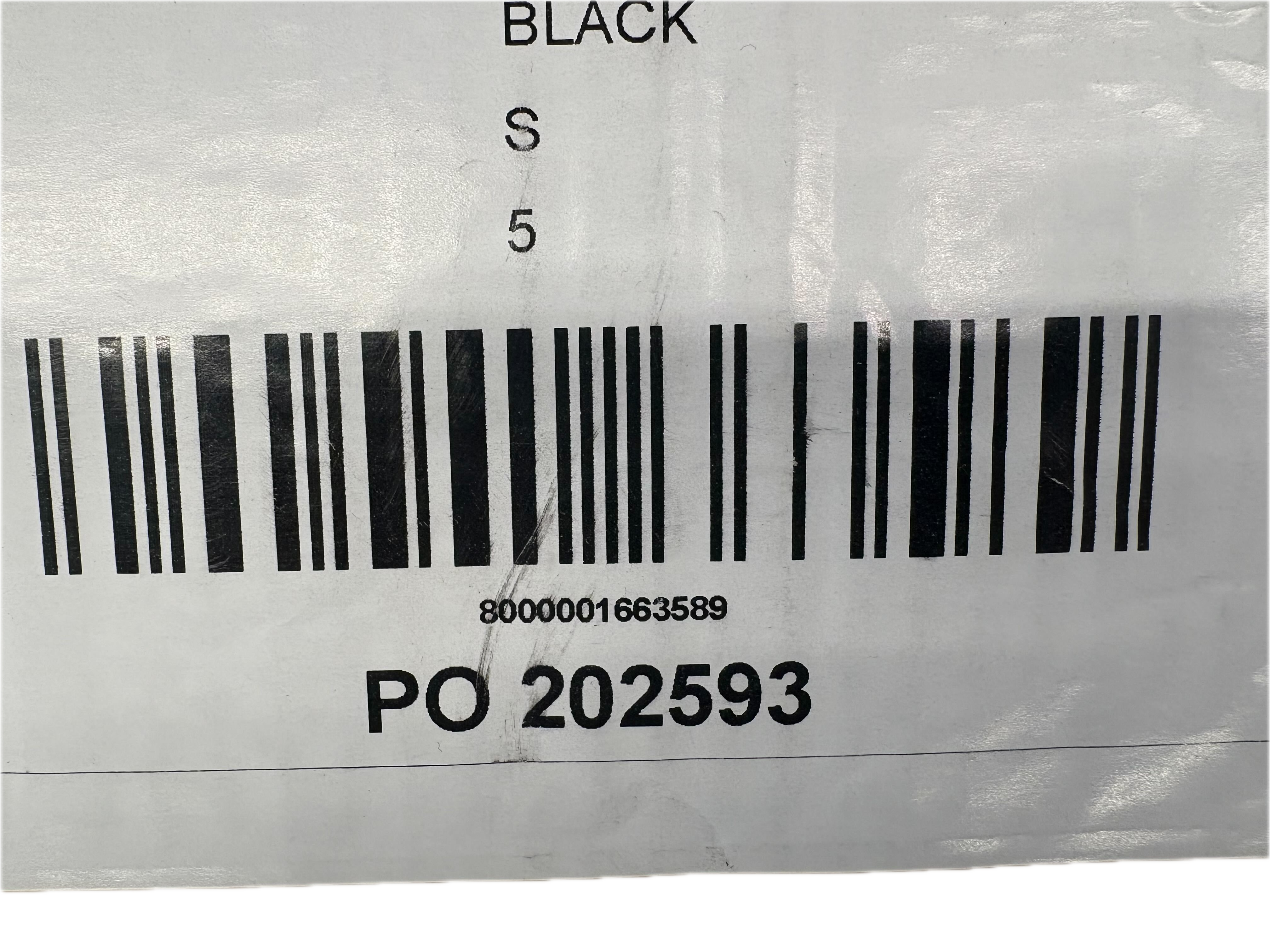
Example carton label showing a Carton ID encoded in the barcode
Critical rule: Carton/PO numbers must be globally unique
Do not use repeating identifiers like “Carton 8.” That number will repeat in future shipments and will cause conflicts and confusion.
Instead, use a carton ID format that will never repeat, such as:
BRAND-YYYYMMDD-#### (e.g., MH-20260119-01236)
VendorPO-#### if VendorPO is guaranteed unique over time
A sequential ID generated from your internal system (as long as it never repeats)
Bottom line: a carton ID should be unique forever.
Step-by-step: Uploading one PO per carton in ShipHero
Step 1: Download the standard PO upload template
Or, in ShipHero, navigate to the Upload Purchase Order page (this is in ShipHero’s “old” UI) and download the standard PO upload CSV template.
Step 2: Fill out the template using the carton manifest
If a carton is single-SKU:
That carton’s PO number appears on one row with that SKU and quantity.
If a carton is mixed-SKU:
Repeat the same carton/PO number across multiple rows—one per SKU.
Example:
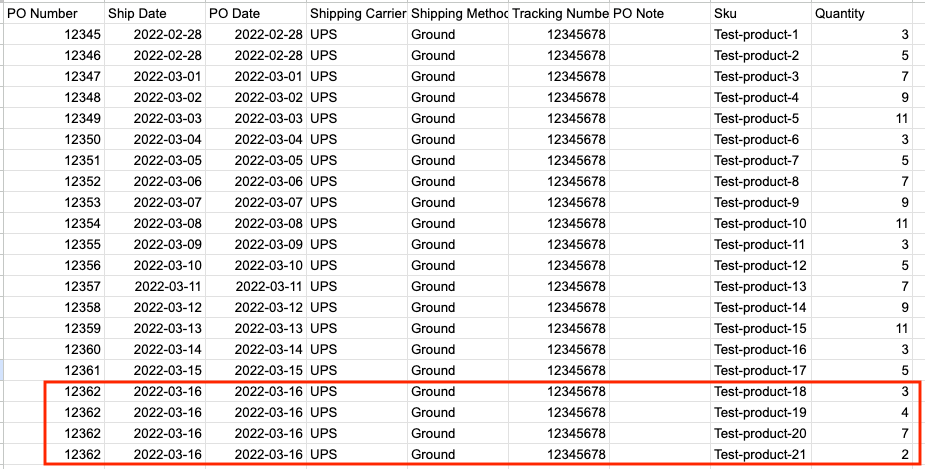
Here's breakdown of the screenshot:
Many cartons under one tracking number
Each carton has its own PO number
A mixed-SKU carton (like PO/carton 12362 outlined in red) appears on multiple lines
Step 3: Upload the CSV into ShipHero
Upload the completed CSV using the Upload Purchase Order workflow.
Step 4: Confirm carton labels are applied before shipment
Before the shipment leaves your vendor:
Ensure every carton has the barcode label with the carton/PO number
Ensure labels are scannable and placed consistently
What happens on our side (and why it’s faster)
When the delivery arrives:
Our receiver scans the carton barcode.
ShipHero immediately pulls up that carton’s PO.
We receive the carton quickly and move on to the next
If there’s an issue, we can flag that specific carton PO and keep receiving the rest.
Best practices and common pitfalls
Best practices
One tracking number can cover many carton POs. That’s normal and expected.
Use a consistent carton ID format and keep it globally unique.
Ensure the manifest matches the labels (carton IDs must match exactly).
Place labels on a consistent side of cartons for fast scanning.
Pitfalls to avoid
Reusing carton numbers across shipments (e.g., “Carton 1–50” every time)
Missing carton labels, or labels that encode the wrong number
Uploading mixed-SKU cartons as if they were single-SKU (or vice versa)
Uploading one large PO for a multi-pallet delivery and expecting fast discrepancy isolation
Vendor email snippet you can copy/paste
Here’s a simple message you can send to your vendor/manufacturer:
For this shipment, please provide a carton manifest that lists each carton’s unique carton ID, the SKUs inside, and quantities per SKU. Please assign a globally unique carton ID to every carton (do not reuse carton numbers in future shipments). Please print and apply a scannable barcode label to each carton that contains the carton ID.
Questions we can help with
If you want, we can review:
Your carton ID format to ensure uniqueness
A sample carton manifest before you upload
A sample label to confirm scan reliability
Your first CSV upload to confirm the structure is correct